How We Built NHODO: An Ancient Stone Game on the Web
Building NHODO meant translating a physical rhythm into a readable touchscreen loop: toss Amai, manage the smaller pebbles and catch at the right moment. The project is a mobile web game inspired by Zimbabwean stone-catching play, not a claim that every community uses one identical ruleset.
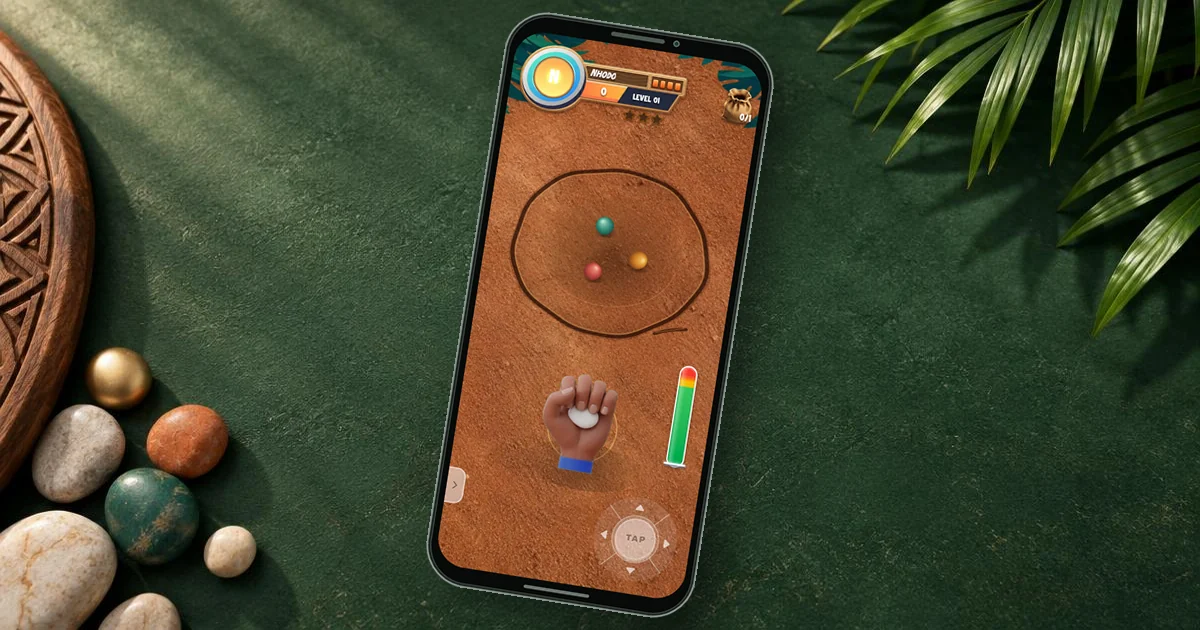
This is a technical account of the implementation visible in the current project. It is not a launch-performance case study: we are not inventing download figures, development costs or player-retention results. The featured image places an actual NHODO screenshot inside a phone mock-up on an AI-generated background; the game display has not been redrawn.
Begin with the interaction, not the technology
A physical catching game gives players direct information through sight and movement. On a phone, the game must communicate the same time pressure through animation, a clear catch marker and responsive input. Our central challenge was keeping those signals consistent rather than adding more explanatory text.
Traditional African games gives cultural context, while our Jacks and Knucklebones guide explains a related toss-and-pick-up pattern without treating the games as interchangeable. For the digital version's own sequence, read how to play NHODO.
Separate the running game from the page interface
NHODO uses React with TanStack Start for pages and menus. Its game engine owns canvas drawing, movement and gameplay actions. The surrounding interface observes game state to show counters, controls and menus rather than driving each animated frame through page updates.
This separation keeps responsibilities clearer: a catch decision belongs to the engine, while presenting a score or opening a menu belongs to the interface. The TanStack Start documentation describes the application framework; it is not itself a game-physics library.
Draw the playfield with canvas
The playfield uses a two-dimensional canvas for moving pebbles, the animated hand and Amai's flight. The engine schedules its loop with requestAnimationFrame. Canvas makes it possible to redraw objects together in one scene, but it does not automatically guarantee a particular frame rate.
The browser's Canvas API handles drawing, while requestAnimationFrame schedules callbacks with the browser's rendering cycle. Smoothness still depends on the device, drawing cost and the amount of work performed per frame.
Keeping decorative page effects separate from the game loop also makes it easier to respect reduced-motion preferences without redefining the catching rules. An attractive background should not obscure the stones or the controls the player needs to inspect.
Make the catch signal agree with the flight
The catch marker uses Amai's normalized height during a throw. Catch judging uses that same representation, so the displayed position and awarded outcome share one basis. A marker that moves on an unrelated timer would make a correct-looking tap feel unfair.
Balancing values are held separately from the drawing code. That makes it possible to adjust catch windows and level pacing without rewriting the renderer. This is an implementation choice, not proof that the current balance is perfect for every player; tuning still needs actual play and observation.
Turn taps and swipes into explicit actions
The round touch control distinguishes a tap on release from an upward swipe. Captured pointer gestures help keep the interaction coherent when the finger travels beyond the original target. The engine also accepts gestures from the relevant play area.
Pointer events provide a common model for mouse, touch and pen input. The important design point is not merely using that API: an upward swipe should not accidentally become a catch when the player returns their finger to rest.
Controls remain visible between throws, and the game avoids long instructional sentences during play. That does not mean accessibility is finished. Reach, contrast, understandable states and alternative input all require ongoing evaluation with real players.
Pause the game without losing the throw
Pause belongs to the engine. When paused, it stops advancing the live gameplay and accepting play input while the menu remains usable. Resuming preserves the throw rather than quietly restarting it underneath the dialog.
Treating pause as only a visible overlay would leave the stones and catch clock moving behind it. For a timing game, freezing the underlying state is more important than how the menu looks.
Use browser audio deliberately
NHODO's background mbira loop uses browser audio, and its game cues are synthesized separately. The music remains consistent across the home screen, menus and gameplay rather than changing tracks every time the player opens a screen.
The Web Audio API provides audio processing and scheduling. Browsers can restrict playback before user interaction, so sound must cope with that rather than treating a silent initial visit as a game failure. Player sound settings and hidden-tab behaviour matter as much as the choice of instrument.
Be honest about what a web game provides
A mobile web game can run in a compatible browser; that is different from promising a native store release. NHODO also has local progress handling. Local progress is not the same as a verified account service, cross-device sync or a live online ranking system.
The access model is free play with ads or one-time lifetime ad-free access. That product direction is not a claim that every payment or advertising integration is live. A development article should distinguish implemented interaction from future connected services.
Test the rules and the complete experience
The project includes tests around engine behaviour, pacing, scoring and gesture-related movement. Automated checks help identify regressions in specific logic, but they do not establish that a touch target is reachable or that animation feels fair on a particular phone.
A useful testing routine combines rule checks with browser play: start a run, throw, return pebbles, catch, pause and resume. Check the outcome as well as the animation. Avoid treating a clean compilation as evidence that the whole player experience works.
Lessons for making a mobile web game
Keep one authoritative gameplay state. The visible meter and scoring decision should not be maintained as unrelated interpretations of the same throw.
Separate tuning from rendering. Balance changes are easier to review when values do not hide inside animation code.
Prefer a small set of dependable gestures. A touch interface should distinguish player intent before adding more commands.
Describe the product honestly. Browser support, local progress and sample website rankings are not substitutes for native distribution or connected services.
Frequently asked questions
Yes. The current implementation uses a browser-based game experience with mobile-focused touch controls.
The gameplay scene uses a two-dimensional canvas, with frame updates scheduled through requestAnimationFrame.
The game engine owns live movement and drawing. React presents the surrounding interface and observes game state.
The displayed marker and catch judging use the same normalized Amai height during a throw.
No. Local progress handling does not by itself provide cross-device accounts, recovery or a verified online leaderboard.
No. Taps and swipes translate part of the timing challenge, but do not reproduce the grip and weight of real stones.
Try the interaction for yourself
The clearest explanation is a complete throw: watch Amai, manage the smaller pebbles and make the catch. Discover NHODO, then compare the digital controls with the physical activities in our fine motor games guide.
Sources and Further Reading
Game rules, names and terminology vary between communities and regions.